


SFST Report – Unofficial Tool
4.214.00 Reviews
App Specs
- Version
- 1.11
- Updated On
- License
- Free
- Downloads
- 10,000+
- Developer
- Bonsaisoft LLC
- Categories
- Business
- Platform
- Android
Screenshots

 Analysis by AppCompare
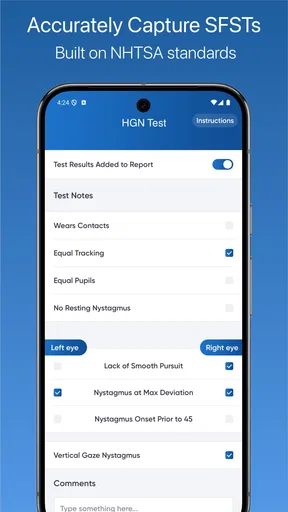
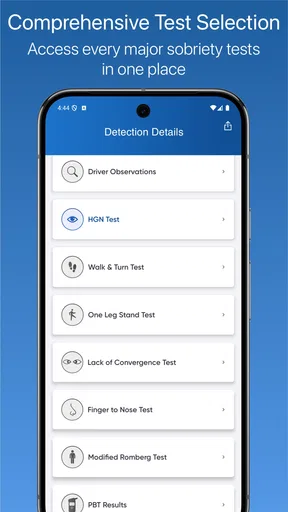
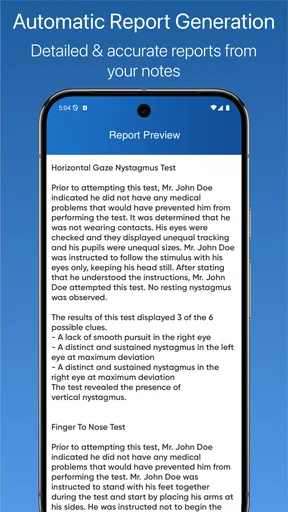
I approached SFST Report – Unofficial Tool as a practical business app rather than something designed for casual browsing. Its purpose is narrow but important: it helps document DUI reporting and field sobriety testing through an NHTSA-based workflow. That immediately makes it more specialized than a general notes app, a blank form builder, or a simple checklist.
My first impression is that this is the kind of tool that earns its place by reducing scattered paperwork during a demanding situation. The value is not in entertainment or visual polish; it is in keeping observations, test details, and report-related information together. For someone who already works with standardized roadside documentation, that focus can make the app easier to justify than a multipurpose business application.
The app is free to install, is rated for Everyone, and comes from Bonsaisoft LLC. It has reached over ten thousand installs and holds a 4.2 average from dozens of ratings, with a smaller group of written reviews. Those figures suggest a focused user base rather than a mass-market audience. I would treat that as a sign to judge it by workflow fit, not popularity alone.
How the workflow feels when speed matters
I look at the workflow first because speed in field documentation comes from knowing where each detail belongs, not from tapping faster. In this section, I consider how a focused report process can help keep observations organized while still leaving room for a careful final check. That balance becomes especially important when the same tool is used repeatedly.
A focused form can be faster than a general notes app
In a real roadside scenario, the main advantage of a dedicated SFST report tool is structure. A blank note-taking app forces me to remember what to record, decide how to organize it, and later turn those notes into something coherent. A purpose-built report app starts from the assumption that the information belongs to a field sobriety testing process.
That distinction matters when attention is divided between conversation, observation, safety, and documentation. I would expect the most useful moments to come before and after the physical tests: preparing a consistent record, entering observations while they are fresh, and checking that the report follows a familiar sequence before moving on.
Speed here should not be confused with raw launch performance. The bigger question is how quickly I can find the right place to enter a detail without improvising a filing system. A specialized layout has the potential to save more time than a faster but empty text editor, especially for repeated professional use.
Worth Reading Before You Choose

Flipboard Shows What News Apps Must Do Beyond the Feed

Switching to Android Auto Means Rethinking Your Driving Routine

Google Calendar Makes a Crowded Week Easier to Manage

Ludo King Makes the Most of the Minutes Between Plans

Baby Panda World Brings Quick Play to Modern Phones, but Its Game Library Feels Busy

ESPN’s Live Game View Makes Following Close Games Easier
Where the app can slow a user down
The same specialization that helps an experienced user may create friction for someone seeing the workflow for the first time. If I do not already understand SFST terminology or the expected order of observations, the app is unlikely to teach the underlying procedure from scratch. It is a documentation aid, not a replacement for training, judgment, or local requirements.
I would also avoid treating a digital form as permission to rush. The best workflow is to observe first, record carefully, and review the entry before relying on it. A quick tap is not automatically a good record. In this category, accuracy and clarity are more important than shaving a few seconds from data entry.
One practical tip is to decide in advance how the app will fit into the wider process. If the final report must be transferred, printed, stored, or reviewed elsewhere, I would test that complete path before using it in a live situation. The app may be efficient at collecting information while still requiring another step for official handling.
What I would prepare before relying on it
I would spend time learning the screens in a calm environment, using a fictional practice case. That lets me discover where observations belong and which fields deserve careful review. It also exposes any awkward navigation before the pressure of an actual roadside encounter.
A second useful habit is to keep a consistent naming and review routine. If several reports are created close together, clear identification and a deliberate final check become more important than simply finishing the form. A dedicated app can organize the process, but it cannot correct an unclear observation or an incomplete entry.
Heavy-use moments and everyday professional scenarios
Repeated use changes what matters: small navigation choices and a clear routine can make a bigger difference than a quick first impression. I’ll look at how the app may fit a realistic roadside report and what a team should settle in advance so individual habits do not undermine consistency. Those practical demands lead naturally to questions about preserving and reviewing the record.
A realistic roadside use case
Imagine an officer documenting a suspected impaired-driving encounter after completing the relevant field sobriety observations. Instead of writing disconnected notes in a generic application, the officer opens this tool and works through the report-oriented process while the details are still recent. The app’s narrow purpose may help keep the record centered on the encounter rather than mixing it with unrelated notes.
After entering the observations, I would use the remaining time to review wording, sequence, and identifying details. That review is where a structured tool can be more helpful than a loose text document. The goal is not merely to store information, but to leave behind a record that another person can understand without reconstructing the event from fragments.
There is also a less obvious use case: preparing for consistency across a team. Even when different people have different writing habits, a shared report-oriented workflow can encourage similar coverage of the same broad areas. I would still want the team to agree on training and review practices, because an app alone does not create uniform professional standards.
What happens during repeated or demanding use
Heavy use is likely to mean repeated report creation, not media-heavy processing or constant background activity. That is good news for the basic performance profile: the app’s purpose does not suggest the kind of workload associated with video editing, gaming, or large file management. Its demanding moments are more likely to be human and procedural than computational.
That does not make every session effortless. Repeated entry can expose small navigation annoyances, especially when I must move between similar fields or correct an earlier detail. A workflow that feels simple once may feel different after several reports in succession. I would judge the app after a realistic practice run rather than after opening it once.
Another trade-off is concentration. A phone is convenient, but it is also a small device that may be exposed to interruptions, glare, cold, gloves, or an unstable working position. The app can reduce paperwork, yet the surrounding conditions can still determine whether digital entry is practical at that moment.
Why a backup routine still matters
For professional documentation, I would not make any single mobile app the only part of the process. Before adopting it, I would clarify how completed information is preserved and how a report can be recovered if the device becomes unavailable. That is not a criticism unique to this application; it is a sensible rule for any phone-based record system.
I would also avoid deleting or resetting anything until the organization’s retention process is clear. A report tool may be useful at the point of entry while the official record must live somewhere else. The safest workflow is one that includes a deliberate handoff and a confirmation that the information arrived where it needs to go.
Reliability, recovery, and confidence in the record
A report is only useful if I can trust the information I entered and understand how to continue after an interruption. Here I focus on simple ways to test recovery and on why a full read-through matters even when a form gives the work structure. That confidence also depends on whether the phone itself is suited to the setting.
Stability is more than whether the app opens
For this kind of tool, reliability means more than a successful launch. I would want confidence that entries remain understandable throughout the session, that navigation does not encourage accidental omissions, and that I can return to the right report without confusion. Those details matter because a documentation app is judged by the quality of the record it helps produce.
The app is currently at version 1.11, which tells me that it has gone beyond its earliest release stage. It first appeared on June 16, 2019, so it is not a brand-new experiment. Even so, version history by itself does not guarantee that every workflow will match a particular agency’s expectations. I would still test it against the forms and procedures I actually use.
Recovery deserves special attention. Before using the app seriously, I would create a harmless test report, close the app, reopen it, and check how easy it is to continue or review the information. I would repeat that exercise after an interruption such as a phone call. This is a simple, non-obvious test that reveals more about practical confidence than a quick installation does.
Handling corrections without losing clarity
Documentation often involves correcting a spelling mistake, refining an observation, or noticing that a detail belongs in another part of the report. I would look for a workflow that makes corrections obvious rather than silently encouraging a confusing mixture of old and new wording. If the app makes editing easy, I would still review the complete report afterward instead of checking only the changed field.
That full review is especially important when the report is built under pressure. A structured form can prevent some omissions, but it may also create a false sense that completion equals accuracy. My recommendation is to treat the final pass as a separate stage: read the record as if you were someone who was not present and needed to understand what happened.
Unofficial status and professional responsibility
The word “Unofficial” in the app’s name is important. I would not assume that the application itself is an official government system or that its output automatically satisfies every department, court, or jurisdictional requirement. The NHTSA-based focus is useful context, but local policy and approved documentation procedures remain decisive.
This is the biggest reliability qualification for me. A technically stable app can still be the wrong operational choice if an organization requires a different form, a controlled records platform, or a specific approval process. I would confirm acceptance with the responsible supervisor or agency before making it part of a formal workflow.
Device constraints and cost considerations
Before relying on a mobile reporting tool, I would weigh the device in hand alongside the app: screen readability, battery condition, and the realities of entering information outdoors. I’ll also separate the appeal of free access from the decision to pay for optional items, so the final verdict stays grounded in actual workflow needs.
Android compatibility and practical hardware limits
The minimum operating-system requirement is Android 6.0, which gives the app a broad compatibility range among older Android phones and tablets. That is helpful for organizations working with existing equipment rather than replacing devices just to run a report tool.
Older hardware can still affect the experience. Even if the app itself is modest, a phone with a tired battery, a damaged screen, limited storage, or aggressive background restrictions can make field documentation unpleasant. I would evaluate the complete device, not just the operating-system requirement, and keep the screen readable before beginning a report.
Resource demands are likely to be lighter than those of visually intensive apps because the job centers on report entry. I would not promise that every device behaves identically, though. Keyboard behavior, screen size, system interruptions, and device-specific power management can all influence how quickly the workflow feels.
Free access with optional spending
The app is free, which makes it easy to try without committing money at the start. There are in-app purchases ranging from $1.99 to $29.99 per item, so I would inspect the available purchase points before building a workflow around features that may sit behind them.
For an individual user, the free entry point is useful for testing whether the report structure fits existing habits. For a department or business, the more important question is total operating cost and whether the purchase model aligns with multiple devices or users. I would make that decision only after confirming which functions are needed in practice.
A sensible approach is to test the complete basic workflow first: create a practice report, review it, and determine how it would move into the official process. Only then would I consider paying for additional capabilities. That avoids spending based on assumptions and keeps the evaluation tied to a real need.
Who should choose another option
I would skip this app if I needed a broad case-management platform, collaborative records, extensive administrative controls, or a tool built around a different jurisdiction’s exact forms. A general notes app may be better for occasional personal reference, while an organization-wide records system may be the right choice when auditing, permissions, and centralized retention are essential.
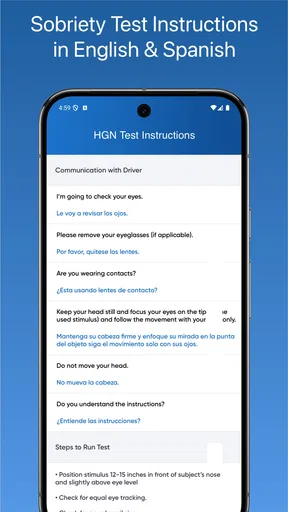
I would also look elsewhere if I wanted detailed instructional training rather than documentation support. The app’s value is strongest for someone who already understands the field sobriety testing process and wants a focused way to record it. Beginners should not mistake a form-oriented interface for a complete course or legal guide.
My performance verdict after weighing the trade-offs
My overall view is favorable but deliberately narrow. SFST Report is most convincing when I imagine a trained user who needs a focused mobile workflow for DUI reporting and field sobriety test documentation. Its specialized purpose can be faster and clearer than starting with a blank notes page, especially when repeated work benefits from a consistent structure.
The app’s likely performance strengths are simplicity of scope, modest device demands, and a workflow centered on one professional task. Its main weaknesses are equally practical: the need to verify local acceptance, the responsibility to protect and transfer records properly, and the possibility that a small-screen form becomes awkward in difficult field conditions.
I would recommend trying it on the exact Android device intended for work, using a fictional scenario and a full review-and-recovery exercise. Check how it behaves after interruption, how corrections are handled, and how the finished report fits into the organization’s approved process. Those tests will tell you more than the install count or average rating.
For trained users who want an accessible starting point and understand its unofficial status, the free installation makes evaluation straightforward. For agencies that require tightly controlled records or officially mandated software, it should be treated as a candidate for review rather than an automatic replacement. The strongest reason to use it is focused documentation; the strongest reason to hesitate is assuming that focused documentation alone equals an approved record system.
In short, I see it as a practical specialist tool rather than a complete professional ecosystem. Bonsaisoft LLC has aimed at a clearly defined business need, and that focus is its advantage. If your work matches that need and you validate the workflow before relying on it, this app can be a useful companion. If your priority is centralized compliance, collaboration, or formal institutional control, a dedicated records platform will probably serve you better.
Pros
- Quickly access SFST-related reports from a mobile-friendly interface.
- Unofficial status may offer useful features beyond the official service.
- Convenient for checking report information while away from a desktop.
- Simple purpose makes the app easy to understand and use.
- Can save time compared with repeatedly searching through web pages.
Cons
- Unofficial apps may change or stop working if the source service is updated.
- Report accuracy depends on the underlying SFST data and update schedule.
- May require internet access for most features and current information.
- Limited support options may be available if errors or outages occur.
- Users should review permissions and privacy practices before entering personal data.
FAQs for SFST Report – Unofficial Tool
What is SFST Report – Unofficial Tool used for?
SFST Report – Unofficial Tool is designed to help users access and review information related to SFST reports in a more convenient digital format. It may provide organized report details, reference material, or shortcuts to commonly used functions. Because it is unofficial, users should treat it as a companion utility rather than an official replacement for government, law-enforcement, or legal documentation systems.
Is SFST Report – Unofficial Tool an official government or law-enforcement application?
No. The word “Unofficial” is important: this app should not be considered an official application from a government agency, police department, court, or other legal authority. Its information and presentation may be useful for reference, training, or organization, but users should verify important details through the relevant official source. It should never be relied upon as the sole basis for legal, administrative, or professional decisions.
Can I use this app to create or submit an official SFST report?
The app should not automatically be assumed to create, validate, or submit an official SFST report. Depending on the version and available features, it may offer forms, guidance, notes, or report-related tools, but any document produced through it may require separate review and submission through an approved system. Always follow your department’s procedures, applicable regulations, and official documentation requirements before using its output.
Is SFST Report – Unofficial Tool suitable for professional training or field use?
It may be useful as a supplementary reference for people studying or working with standardized field sobriety testing documentation, especially when reviewing terminology, report structure, or common information fields. However, suitability depends on the user’s jurisdiction, agency policy, and the app’s current content. Professionals should compare its material with approved training resources and avoid using it as a substitute for certification or formal instruction.
What privacy and security precautions should I take before using the app?
Before entering information, review the app’s privacy policy, requested permissions, storage behavior, and developer details. Avoid adding unnecessary personal data, confidential case information, driver details, or evidence-related material unless you fully understand how that information is stored and protected. Since the tool is unofficial, users should be especially cautious and consider using fictional or non-sensitive information for testing and learning purposes.


